Stake Your Sushi LP Position
Staking your Sushi LP position on Katana earns you KAT token emissions. This guide walks you through how to stake your LP tokens so you can start earning rewards when Epoch 1 begins.
Staking is required to earn KAT emissions
Starting with Epoch 1 on March 26, 2026, only staked LP positions earn KAT emissions. Unstaked LP positions will no longer receive KAT rewards. Make sure to stake your LP tokens before Epoch 1 begins.
What You Need
- A Sushi LP position on Katana
- Your wallet connected to the Katana app
How to Stake Your LP Position
- Go to the Katana Portfolio page.
- Find your Sushi LP position in the list.
- Click the Stake button next to your position.

- Approve the transaction in your wallet, this allows the staking contract to access your LP tokens.
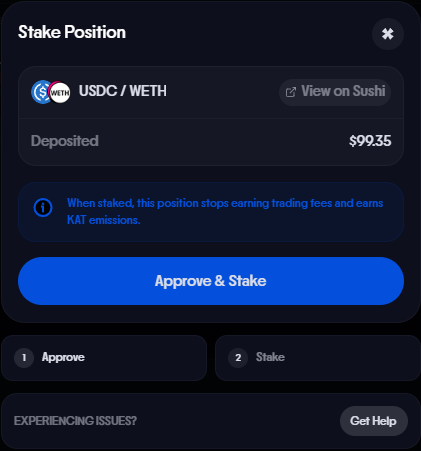
- Confirm the stake transaction in your wallet.
- Once confirmed, your LP position is staked and will begin earning KAT emissions starting Epoch 1.
Rewards
Once your LP tokens are staked, rewards are distributed in KAT tokens. Emissions are directed to liquidity pools through the gauge voting system — vKAT and avKAT holders vote on which pools receive emissions each epoch.
Only in-range positions earn rewards
Your staked LP position must be in range to earn KAT emissions. If the current price moves outside your position’s price range, your position will stop earning rewards until it comes back in range or you rebalance.
For more on how gauge voting and emissions work, see KAT Staking.
Rebalancing Your Position
If the price moves outside your LP range, your position stops earning fees and emissions. You can rebalance by unstaking, removing liquidity, minting a new position at the current price, and restaking.
For a developer walkthrough with full code examples using viem and wagmi, see the Rebalance Your Staked LP Position tutorial.